
Thursday, June 5, 2014

GSoC Open Source Brain: Google Summer of Code 2014 Presentation

Presentation

Introduction

My name is Ramon Heberto Martinez and I am student in the Erasmus Mundus Master in Complex Systems Science. I will use the coming series of entries in this blog to describe and report my progress in the project for Google Summer of Code 2014 (GSoC 2014). I have been lucky enough to have my proposal entitled Open source, cross simulator, large scale cortical models with the International Neuroinformatics Coordinating Facility (INCF). This project will be co- mentored by Andrew Davison at the INCF's French branch and Padraig Gleeson from the INCF branch in the UK.

The Project

As we advance the study of the brain we have required more powerful tools to study it. In particular more powerful computational tools have become available as well as more elaborated simulation environments. An example of these efforts is the Open Source Brain Project (OSB) project that provides a space where the computational models can be built collaboratively and shared with open standards such as PyNN [Davison et al., 2008] and NeuroML [Gleeson et al., 2010].

On the other hand there is a lack of well tested open models that can serve as benchmarks to test and reliably compare the capabilities of the different environments. It is the spirit of this project to try to reduce the lack of such models. In particular this project will consist on developing models of the visual system which, at the date that I write, is an area not very well covered by the OSB project so far

The work specifically will consist on developing the code of the models below in PyNN and release them as free code in the platform of the Open Source Brain Project
. Papers:

  • Different roles for simple-cell and complex-cell inhibition in v1 [Lauritzen and Miller, 2003].
  • Inhibitory stabilization of the cortical network underlies visual surround suppression [Ozeki et al., 2009]
  • Feedforward origins of response variability underlying contrast invari- ant orientation tuning in cat visual cortex [Sadagopan and Ferster, 2012]
The theme of the papers is to have a thorough set of properties of the visual system (V1) and in particular of the orientation invariance property.

References and Links

References

  • Andrew P Davison, Daniel Br ̈derle, Jochen Eppler, Jens Kremkow, Eilif Muller, Dejan Pecevski, Laurent Perrinet, and Pierre Yger. Pynn: a common interface for neuronal network simulators. Frontiers in neuroinformatics, 2, 2008.
  • Padraig Gleeson, Sharon Crook, Robert C Cannon, Michael L Hines, Guy O Billings, Matteo Farinella, Thomas M Morse, Andrew P Davison, Subhasis Ray, Upinder S Bhalla, et al. Neuroml: a language for describing datadriven models of neurons and networks with a high degree of biological detail. PLoS computational biology,(6):e1000815, 2010.
  • Thomas Z Lauritzen and Kenneth D Miller. Different roles for simple-cell and complex-cell inhibition in v1. The Journal of neuroscience, 23(32):10201–10213, 2003.
  • Hirofumi Ozeki, Ian M Finn, Evan S Schaffer, Kenneth D Miller, and David Ferster. Inhibitory stabilization of the cortical network underlies visual surround suppression. Neuron, 62(4):578–592, 2009.
  • Roger D Peng. Reproducible research in computational science. Science (New York, Ny), 334(6060):1226, 2011.
  • Srivatsun Sadagopan and David Ferster. Feedforward origins of response variability underlying contrast invariant orientation tuning in cat visual cortex. Neuron, 74(5):911–923, 2012.

Links

Project Page at INCF
PyNN
NeuroML
Open Source Brain Project
Neural Ensemblet
International Neuroinformatics Coordinating Facility
Google Summer of Code 2014

Friday, April 18, 2014

Sumatra 0.6 released

We would like to announce the release of version 0.6.0 of Sumatra, a tool for automated tracking of simulations and computational analyses so as to be able to easily replicate them at a later date.

This version of Sumatra sees many new features, improvements to existing ones, and bug fixes:

New export formats: LaTeX and bash script

You can now export your project history as a LaTeX document, allowing you to easily generate a PDF listing details of all the simulations or data analyses you've run.

    $ smt list -l -f latex > myproject.tex

Using tags, you can also restrict the output to only a subset of the history.

You can also generate a shell script, which can be executed to repeat the sequence of computations captured by Sumatra, or saved as an executable record of your work. The shell script includes all version control commands needed to ensure the correct version of the code is used at each step.

    $ smt list -l -f shell > myproject.sh

Working with multiple VCS branches

Previous versions of Sumatra would always update to the latest version of the code in your version control repository before running the computation.

Now, "smt run" will never change the working copy, which makes it much easier to work with multiple version control branches and to go back to running earlier versions of your code.

Programs that read from stdin or write to stdout

Programs that read from standard input or write to standard output can now be run with "smt run". For example, if the program is normally run using:

    $ myprog < input > output

You can run it with Sumatra using:

    $ smt run -e myprog -i input -o output

Improvements to the Web browser interface

There have been a number of small improvements to the browser interface:

  • a slightly more compact and easier-to-read (table-like) layout for parameters;
  • the working directory is now displayed in the record detail view;
  • the interface now works if record label contain spaces or forward slashes.

The minimal Django version needed is now 1.4.

Support for PostgreSQL

The default record store for Sumatra is based on the Django ORM, using SQLite as the backend. It is now possible to use PostgreSQL instead of SQLite, which gives better performance and allows the Sumatra record store to be placed on a separate server.

To set up a new Sumatra project using PostgreSQL, you will first have to create a database using the PostgreSQL tools ("psql", etc.). You then configure Sumatra as follows:

    $ smt init --store=postgres://username:password@hostname/databasename MyProject

Note that the database tables will not be created until after the first "smt run".

Integration with the SLURM resource manager

Preliminary support for launching MPI computations via SLURM has been added.

  $ smt configure --launch_mode=slurm-mpi
  $ smt run -n 256 input_file1 input_file2

This will launch 256 tasks using "salloc" and "mpiexec".

Command-line options for SLURM can also be set using "smt configure"

  $ smt configure --launch_mode_options=" --tasks-per-node=1"

If you are using "mpiexec" on its own, without a resource manager, you can set MPI command-line options in the same way.

Improvements to the @capture decorator

The "@capture" decorator, which makes it easy to add Sumatra support to Python scripts (as an alternative to using the "smt" command), now captures stdout and stderr.

Improvements to parameter file handling

Where a parameter file has a standard mime type (like json, yaml), Sumatra uses the appropriate extension if rewriting the file (e.g. to add parameters specified on the command line), rather than the generic ".param".

Migrating data files

If you move your input and/or output data files, either within the filesystem on your current computer or to a new computer, you need to tell Sumatra about it so that it can still find your files. For this there is a new command, "smt migrate". This command also handles changes to the location of the data archive, if you are using one, and changes to the base URL of any mirrored data stores. For usage information, run:

    $ smt help migrate

Miscellaneous improvements

  • "smt run" now passes unknown keyword args on to the user program. There is also a new option '--plain' which prevents arguments of the form "x=y" being interpreted by Sumatra; instead they are passed straight through to the program command line.
  • When repeating a computation, the label of the original is now stored in the 'repeats' attribute of 'Record', rather than appending "_repeat" to the original label. The new record will get a new unique label, or a label specified by the user. This means a record can be repeated more than once, and is a more reliable method of indicating a repeat.
  • A Sumatra project now knows the version of Sumatra with which it was created.
  • "smt list" now has an option '-r'/'--reverse' which lists records oldest to newest.

Bug fixes

A fair number of bugs have been fixed.

Download, support and documentation

The easiest way to get the latest version of Sumatra is

  $ pip install sumatra

Alternatively, Sumatra 0.6.0 may be downloaded from PyPI or from the INCF Software Center. Support is available from the sumatra-users Google Group. Full documentation is available on pythonhosted.org.

Monday, March 3, 2014

Docker image to run the software neural simulators used in BrainScaleS

Docker is like a virtual machine (Virtualbox, VMware,...) but with one huge advantage for everyone wanting to run a neural simulator on his own computer: being based on Linux containers, a Docker image can use all the resources (CPUs, RAMs) of your host computer.
That's why we have decided to put all the tools needed to run the software neural simulators used in the European project BrainScaleS into an openly accessible docker image. To use it, please follow the official step-by-step guide.
This Docker image (brainscales/neural-networks:software) contains the following neural simulators and the associated tools (openmpi, visualization,...):
  • NEST (version 2.2.2)
  • NEURON (version 7.3)
  • Brian (latest version from PyPI, currently 1.4.1)
  • PyNN (latest version from PyPI, currently 0.7.5), the language-independent simulator (it uses as backend either NEST, Brian or NEURON),
  • MUSIC, the multi-simulation coordinator (multiconn branch). Note that, in this image, only NEURON has been compiled with MUSIC.
To use this image, you need to install Docker on your host computer. On an Ubuntu computer, this means installing lxc-docker:
  $ sudo apt-get install lxc-docker
Then, you download the image from the Docker index repository:
  $ sudo docker pull brainscales/neural-networks:software
You can now follow this step-by-step guide to run the examples from all these neural simulators using all the resources from your host computer, without having to install other software than Docker itself and a ssh client. Enjoy!

Joël Chavas and Andrew Davison.

Wednesday, January 22, 2014

Tools for cortical modelling from the Bednar Lab

Jim Bednar writes:

"We are pleased to announce the availability of a comprehensive new example of modelling topographic maps in the visual cortex, suitable as a ready-to-run starting point for future research. This example consists of:

1. A new J. Neuroscience paper (Stevens et al. 2013a) describing the GCAL model and showing that is is stable, robust, and adaptive, developing orientation maps like those observed in ferret V1.

2. A new open-source Python software package, Lancet, for launching simulations and collating the results into publishable figures.

3. A new Frontiers in Neuroinformatics paper (Stevens et al. 2013b) describing a lightweight and practical workflow for doing reproducible research using Lancet and IPython.

4. An IPython notebook showing the precise steps necessary to reproduce the 842 simulation runs required to reproduce the complete set of figures and text of Stevens et al. (2013a),  using the Topographica simulator.

5. A family of Python packages that were once part of Topographica but are now usable by a broader audience. These packages include 'param' for specifying parameters declaratively, 'imagen' for defining 0D, 1D, and 2D distributions (such as visual stimuli), and  'featuremapper' for analyzing the activity of neural populations  (e.g. to estimate receptive fields, feature maps, or tuning curves).

The resulting recipe for building mechanistic models of cortical map development should be an excellent way for new researchers to start doing work in this area.

Jean-Luc R. Stevens, Judith S. Law, Jan Antolik, Philipp Rudiger, Chris Ball, and James A. Bednar

Computational Systems Neuroscience Group
The University of Edinburgh


_______________________________________________________________________________


1. STEVENS et. al. 2013a: GCAL model

Our recent paper:

Jean-Luc R. Stevens, Judith S. Law, Jan Antolik, and James A. Bednar. Mechanisms for stable, robust, and adaptive  development of orientation maps in the primary visual cortex. Journal of Neuroscience, 33:15747-15766, 2013.  http://dx.doi.org/10.1523/JNEUROSCI.1037-13.2013

shows how the GCAL model was designed to replace previous models of V1development that were unstable and not robust.  The model in this paper accurately reproduces the process of orientation map development in ferrets, as illustrated in this animation comparing GCAL, a simpler model, and chronic optical imaging data from ferrets.


2. LANCET

Lancet is a lightweight Python package that offers a set of flexible components to allow researchers to declare their intentions succinctly and reproducibly. Lancet makes it easy to specify a parameter space,
run jobs, and collate the output from an external simulator or analysis tool. The approach is fully general, to allow the researcher to switch between different software tools and platforms as necessary.


3. STEVENS et. al. 2013b: LANCET/IPYTHON workflow

Jean-Luc R. Stevens, Marco I. Elver, and James A. Bednar.  An Automated and Reproducible Workflow for Running and Analyzing  Neural Simulations Using Lancet and IPython Notebook. Frontiers in Neuroinformatics, in press, 2013. http://www.frontiersin.org/Journal/10.3389/fninf.2013.00044/abstract

Lancet is designed to integrate well into an exploratory workflow within the Notebook environment offered by the IPython project. In an IPython notebook, you can generate data, carry out analyses, and plot the results interactively, with a complete record of all the code used.
Together with Lancet, it becomes practical to automate every step needed to generate a publication within IPython Notebook, concisely and reproducibly.  This new paper describes the reproducible workflow and shows how to use it in your own projects.


4. NOTEBOOKS for Stevens et al. 2013a

As an extended example of how to use Lancet with IPython to do reproducible research, the complete recipe for reproducing Stevens et al. 2013a is available in models/stevens.jn13 of Topographica's GitHub repository.  The first of two notebooks defines the model, alternating between code specification, a textual description of the key model properties with figures, and interactive visualization of the model's initial weights and training stimuli. The second notebook can be run to quickly generate the last three published figures (at half resolution) but can also launch all 842, high-quality simulations
needed to reproduce all the published figures in the paper.  Static copies of these notebooks, along with instructions for downloading runnable versions, can be viewed here:

  http://topographica.org/_static/gcal.html
  http://topographica.org/_static/stevens_jn13.html

5. PARAM, IMAGEN, and FEATUREMAPPER

The Topographica simulator has been refactored into several fully independent Python projects available on GitHub (http://ioam.github.io). These projects are intended to be useful to a wide audience of both computational and experimental neuroscientists:

  param: The parameters offered by param allow scientific Python programs to be written declaratively, with type and range checking,  optional documentation strings, dynamically generated values,  default values and many other features.

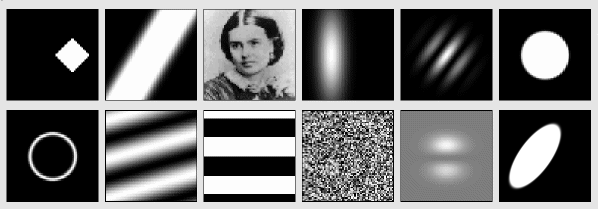
  imagen: Imagen offers a set of 0D,1D and 2D pattern distributions. These patterns may be procedurally generated or  loaded from files. They can be used to generate simple scalar values, such as values drawn from a specific random distribution,  or for generating complex, resolution-independent composite image pattern distributions typically used as visual stimuli (e.g. Gabor and Gaussian patches or masked sinusoidal gratings).


  featuremapper: Featuremapper allows the response properties of a neural population to be measured from any simulator or experimental setup that can give estimates of the neural activity values in  response to an input pattern. Featuremapper may be used to measure preference and selectivity maps for various stimulus features (e.g  orientation and direction of visual stimuli, or frequency for  auditory stimuli), to compute tuning curves for these features, or  to measure receptive fields, regardless of the underlying implementation of the model or experimental setup."

Tuesday, December 10, 2013

BrainScaleS CodeJam #6

Registration is now open for the 6th BrainScaleS CodeJam workshop, which will take place 27th - 29th January 2014 in Jülich, Germany.

The CodeJam workshops are dedicated to bringing together scientists, graduate students, and scientific programmers to share ideas, present their work, and write code together. Mornings are dedicated to invited and contributed talks, leaving the afternoons free for discussions, tutorials and code sprints. These workshops have been hugely effective in catalyzing open-source neuroscience software development.

The 6th CodeJam has a focus on high-performance computing. We invite contributions on any topic related to software in neuroscience, but especially on topics related to the main theme. If you have ideas for organising code sprints, whether a feature that you would like to see added to an existing tool or an idea for new software, please also let us know.

Please visit the event website http://www.fz-juelich.de/ias/jsc/events/codejam to learn more and register. Places are limited, so early registration is recommended.

The local organisation is carried out by the Simulation Lab Neuroscience (SLNS), headed by Abigail Morrison. Originally funded by the FACETS project, the workshops enjoy ongoing funding and support from BrainScaleS, INCF, the Helmholtz Association, the Jülich-Aachen Research Alliance and the Bernstein Network.

Tuesday, November 19, 2013

PyNN 0.8 beta 1 released

We're very happy to announce the first beta release of PyNN 0.8.


For PyNN 0.8 we have taken the opportunity to make significant, backward-incompatible
changes to the API. The aim was fourfold:

  •   to simplify the API, making it more consistent and easier to remember;
  •   to make the API more powerful, so more complex models can be expressed with less code;
  •   to allow a number of internal simplifications so it is easier for new developers to contribute;
  •   to prepare for planned future extensions, notably support for multi-compartmental models.


For a list of the main changes between PyNN 0.7 and 0.8, see the release notes for the 0.8 alpha 1 release.

For the changes in this beta release see the release notes.

The biggest change with this beta release is that we now think the PyNN 0.8 development branch is stable enough to do science with. If you have an existing project using an earlier version of PyNN, you might not want to update, but if you're starting a new project, we recommend using this beta release.

The source package is available from the INCF Software Center


What is PyNN?

PyNN (pronounced 'pine' ) is a simulator-independent language for building neuronal network models.

In other words, you can write the code for a model once, using the PyNN API and the Python programming language, and then run it without modification on any simulator that PyNN supports (currently NEURONNEST and Brian).

Even if you don't wish to run simulations on multiple simulators, you may benefit from writing your simulation code using PyNN's powerful, high-level interface. In this case, you can use any neuron or synapse model supported by your simulator, and are not restricted to the standard models.


The code is released under the CeCILL licence (GPL-compatible).

Wednesday, October 23, 2013

Mozaik - an integrated workflow framework for large scale neural simulations (0.1 release)

Mozaik is intended to improve the efficiency of computational neuroscience projects by relieving users from writing boilerplate code for simulations involving complex heterogenous neural network models, complex stimulation and experimental protocols and subsequent analysis and plotting.

Mozaik integrates the model, experiment and stimulation specification, simulation execution, data storage, data analysis and visualization into a single automated workflow, ensuring that all relevant
meta-data are available to all workflow components. It is based on several widely used tools, including PyNN, Neo and Matplotlib. It offers a declarative way of specifying models and recording configurations, using hierarchically organized configuration files.

To install the stable 0.1 version run:

pip install mozaik

The code repository with the latest developmental version is at  https://github.com/antolikjan/mozaik

The Mozaik homepage, with full documentation, is http://neuralensemble.org/mozaik/